LinkedIn lets you view analytics, but it doesn't let you bulk export your full post history + engagement metrics in a simple file. FetchPosts does.
check_circle Pay once. Own forever. 14-day money-back guarantee.
You make posts. They get views and likes. But LinkedIn won't give you a simple file to download. You can't track what works over time.
LinkedIn hides your old performance data over time. That post from last year? You can't see all its stats anymore.
LinkedIn has no button to download all your posts and numbers to Excel. You're stuck looking at their website.
Without your data, you don't know what works. Every post is a new guess. Winners track their numbers.
FetchPosts runs locally on your machine. We never see your password or your data. It's the safest way to archive your digital legacy.
Log in via the secure local browser. Your credentials never leave your device.
Click one button to scrape your own profile. FetchPosts retrieves posts, views, likes, and comments.
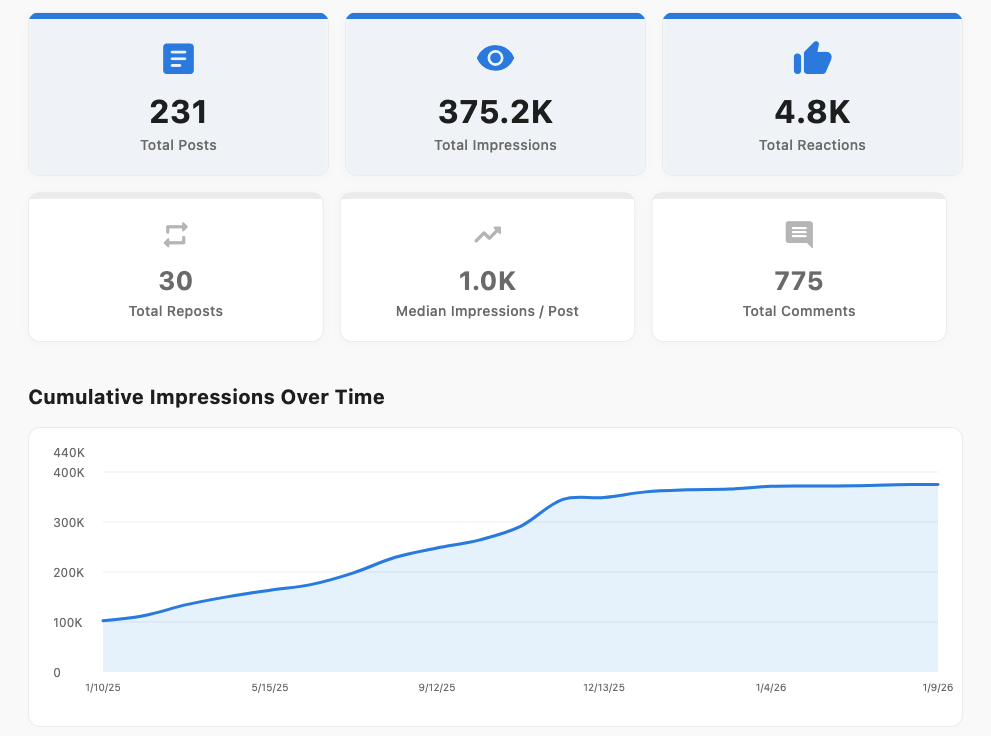
Download as CSV or view beautiful charts directly in the app.
No cloud storage. 100% Private.
Everything downloads to your computer. It's yours to keep.
Every post. Every view. Every like. All in one file. Now you can see what posts did well.
See which posts got the most views and engagement. Do more of what works.
Find your winners. Post them again. That post that got 2,000 views? Use it again next month.
$24. One time. No monthly bills. Other tools cost $20 every month. This pays for itself in 30 days.
One-time payment • macOS only • Saves you $240+/year vs. subscriptions
Buy Now14-day money-back guarantee • Instant delivery
Most LinkedIn analytics tools charge $20-50/month. This pays for itself in 30 days.
Yes, it runs locally on your Mac using your active browser session. We never see your password or cookies.
You get a CSV file with all your posts and key metrics: views, likes, comments, reposts, and dates.
Not yet. FetchPosts is currently macOS only (Intel & Apple Silicon). Windows support is coming soon.
We monitor LinkedIn daily. If they change their layout, we push an update to FetchPosts to fix it immediately.
Yes. Just log in to LinkedIn normally with 2FA, and FetchPosts will use your active session.
Unlikely if used responsibly. The app mimics human browsing behavior. However, always avoid excessive scraping in short periods.
Yes. Click "Deactivate" in the app on your old Mac, then activate the license key on your new one.
Email us at support@fetchposts.com.
We'd love to hear it! Email support@fetchposts.com.
Yes. We offer a 14-day money-back guarantee. Just email support@fetchposts.com.